You are in the category: First Steps with uCoz | All categories
Go to:
or
1.I set two passwords when signing up. Which one should I type in, when logging into my Control Panel?
|
1. I set two passwords when signing up. Which one should I type in, when logging into my Control Panel?
Answer: When signing up, you followed the link sent to you in an e-mail verification message. At this step you were asked to set a secret question and answer, and a password for Control Panels of the websites that you create. That's the password you need! 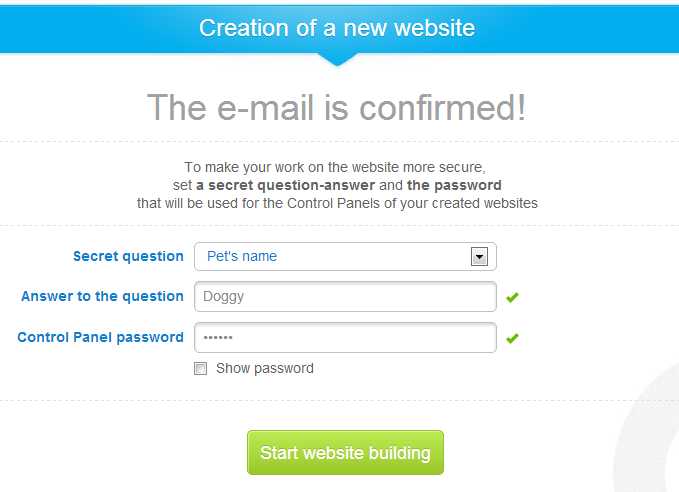 Forgot your password? Please use the following form to retrieve it: guid.uid.me/remind. |
|
Answer: We give unlimited disk space for free. All new websites get 400 MB of storage, but the available disk space increases with each second (the speed depends on the number of website visitors). You can see the available disk space at the top of the Control Panel main page.  It is also possible to get more storage by upgrading to a paid plan. You can do this in the Paid Services section of your site's Control Panel. |
|
Answer: Of course you can replace the website icon with a custom one. You just need to upload an icon to the root folder of your website (after connecting via FTP you are already in it, and the same is with the File Manager). The data for FTP connection can be found on the main page of the Control Panel.  Please see a more detailed guide at uCoz Community Forum. |
|
Answer: Third-level domains (e.g. site.ucoz.com) are given for free. To remove .ucoz. from the address of your website, you will need to attach a personal second-level domain via the website Control Panel -> Domain Attachment. |
|
Answer: Users are the most important part of uCoz. We are always open for communication and inform our users about all system news: uCoz Community Forum You can also follow uCoz news via our social profiles: uCoz on Facebook; uCoz on Twitter. |
|
Answer: When you come across issues that you can't resolve yourself, you can always contact our Support Team via the Control Panel of your website: Help -> Technical Support. Besides, our friendly community is always ready to help and answer your questions. You can discuss your problem and find solutions on our Forum. And don't forget to look through the Frequently Asked Questions. |
|
Answer: All uCoz websites have Indexing status that is displayed at the top of the Control Panel's main page (/panel/?a=cp). The parameter shows whether indexing by search engines is allowed for the website or not (whether the website is in quarantine). The indexing status can show one of the two options: "indexing is allowed (quarantine is removed)":  Or "indexing is prohibited (the website is in quarantine)": 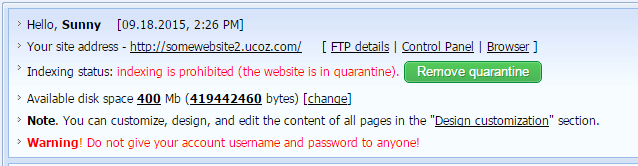 The status "indexing is prohibited (the website is in quarantine)" is assigned by default to all newly created websites. This measure is required as a protection against spammers and websites violating the User Agreement. Remember that search engines won't rank your website high if it is empty. Be sure to add content to the website before you start promoting it. A website can become available for indexing either automatically (if a premium plan is purchased) or upon the website owner's request. If the website does not have a premium plan and the user wants the quarantine to be removed, a request should be submitted from the website's Control Panel: 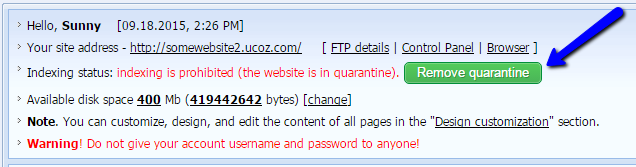 There will be a pop-up window with the info on the quarantine policy: 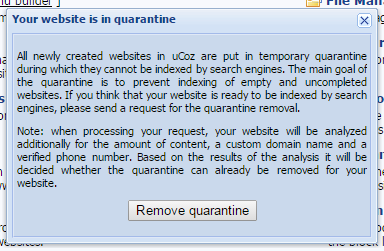 After the request has been submitted, the website will be checked automatically according to a number criteria: the website's age, presence of a custom domain name, content, verified phone number etc. On the basis of these criteria the system decides whether the quarantine should be removed. We cannot provide a more detailed description of the algorithm. Note! If the quarantine removal was denied, the next request can be submitted no sooner than in 7 days. Additional Information: uCoz Community Forum |
|
Answer: You can use uCoz absolutely for free, but in this case an ad banner will be displayed on your website - a sort of payment for using the uCoz website builder. To disable the ad banner, you can upgrade to a paid plan (any except the Minimal one). We also always welcome social and educational projects: their owners and administrators can contact uCoz at banner@ucoz.net for the banner to be removed for free. Please read more on how to remove the ad banner in a detailed tutorial. |
|
Answer: Yes, it is possible. Find the link "File Manager" in the Control Panel and click it. You will see a list of all files, uploaded to the server. To upload a new file from your computer click "Browse", find the necessary file, select it and click "Open". Then click the button "Upload file". Loading should start, and as soon as it has finished a name of your file will appear on the list of files. Pay attention to the maximum size of an uploaded file - 15 Mbytes. You can also upload files to the server using any FTP client (for example, CuteFTP). You can find the details of FTP connection on the main page of your Control Panel, the "FTP details" link at the top. |