You are in the category: Additional Features | All categories
Go to:
or
|
Answer: First of all you need to upload a custom set of smileys via File Manager. To select the uploaded images as the active smileys, go to Control Panel -> Smileys editor.  Now select a smiley image and set its code. Then click "Add".  For the smileys to be displayed in the comment posting form, you need to specify your custom set as the main one. This can be done in Control Panel -> Settings -> Common Settings:  Additional Information: uCoz Community Forum |
|
Answer: BB codes are one of the informal standards of text formatting, without the usage of HTML tags. BB codes guarantee higher safety than HTML tags, since by means of using HTML tags a dishonest user can damage the appearance of your pages, get important information stored in cookie files of your site visitors, and do other illegal actions.  How do I use BB codes in comments? By default the visual comment editor is used on uCoz websites. It makes adding quotes, spoilers, hidden text etc. simpler. To use BB codes in comments, just click BB in the top right corner of the editor.  |
|
Answer: First attach a custom domain like mysite.com in Control Panel -> Domain Attachment (Method 2, domain transfer by DNS). Afterwards you'll be able to set MX records and create domain based e-mail accounts with the help of various mail services, e.g. Gmail.com (Google Mail). You can find instructions on how to create mail boxes in your domain with the help of Gmail.com in Control Panel -> Domain Attachment. |
|
Answer: All menu items are listed in Control Panel -> Design Customization -> Site Menu Builder. Here you can add/edit/delete menu items. 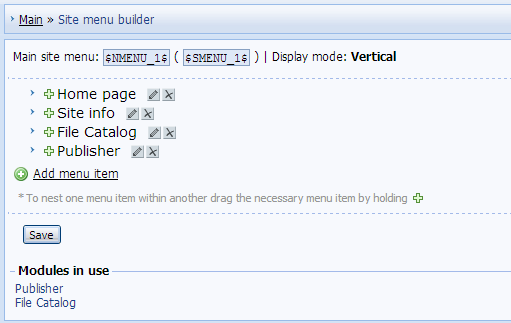 To change the order of the menu items, click the necessary item and drag it to the necessary place. To create subitems, click the plus icon and drag the item into the necessary place. |
|
Answer: It is important that forum moderators can control users' behavior on your website and stop inappropriate behavior. That's why, as a rule, moderators have the permission not only to give awards and change user reputation, but also to give reproofs. To enable the option, go to Control Panel -> Users -> User groups, and check "Change user reproof level" for the necessary group (e.g. for Moderators).  To give a reproof to a user, go to the user's profile page and click the plus icon.  Choose the necessary action in the window that will appear (increase or decrease the reproof level), and provide a reason. For example: 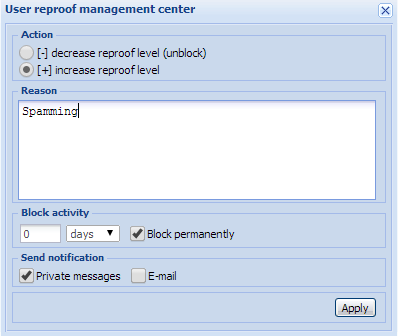 A reproof level is increased/decreased by 20%, this value cannot be changed. A user who reaches the 100% level is automatically banned. To unban such user, the reproof level must be decreased. |
|
Answer: The uCoz Social Bar is a tool which provides a way for users to share and like posts, pages, and information across multiple social networks such as Facebook, Twitter, Google+, and LinkedIn. With it, site visitors are able to like and share pages of your website in just one click! To enable Social Bar, go to Control Panel -> Settings -> Social Bar, choose "Enabled", and customize the bar. You can read more about the uCoz Social Bar and its settings in a separate FAQ section. |
|
Answer: Informers in uCoz are an easy way to present information to users, such as latest forum topics, most popular and commented posts, users who have visited the site today etc. To create an informer, go to Control Panel -> Tools -> Informers -> Create informer.  After you have created an informer, it will be displayed at the bottom of the page. For the informer to be displayed on your website, you need to copy its code and paste it where you want it to appear.  You will find a more detailed tutorial on our Forum. The maximum number of informers that you can create is 30. |
|
Answer: Widgets and gadgets are additional uCoz features, with the help of which you can add various graphic and technical site elements. You can manage widgets and gadgets in the page management section: Control Panel -> Page Editor -> Page management. 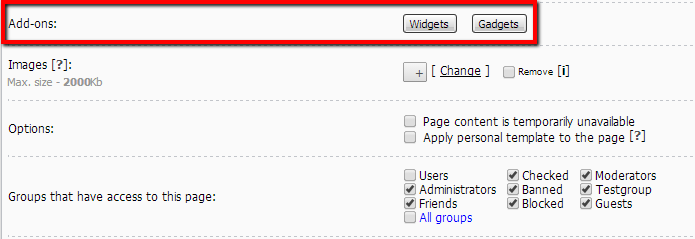 When editing a page, you will see the field with add-ons: widgets and gadgets. Don't forget: for you to be able to work with add-ons, you need to enable the permission to edit site design in the user group settings. After you have chosen a widget or a gadget, you will get its code that should be pasted where you want it to be displayed. |
|
Answer: Awards are a tool that allows site users to give various gifts to each other. To activate the awards, go to Control Panel -> Tools -> Awards -> Install the module. Each award has a number of settings: a timeout, permissions to give it, an ID. Besides, you can set the permissions to view and give certain awards, the page for giving awards, and the areas where they will be displayed. You can read more about the awards on our Forum. |
|
Answer: "Tell a friend" is a feature, used to create an e-mail form. With the help of such e-mail form website visitors can suggest posts and pages to their friends, providing their e-mail addresses. To add the feature, go to Control Panel -> Tools -> Tell a friend -> Create form.  In the form settings you will be able to specify a name of the form, a header and a body of the message that website visitors will send to their friends. After you have created the form, it will be displayed in the "Tell a friend" section of the Control Panel.  To add the form to your website, copy its code and paste it where you want the form to be displayed. |